My Rentals in Telegram
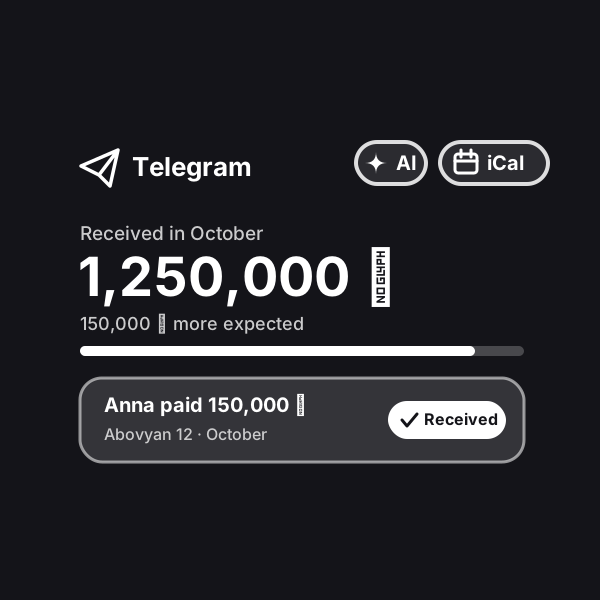
All your apartments in one bot: tenants send payment receipts and meter readings right in Telegram, the bot reminds them about rent on its own, calculates utilities and debts, and the app shows the income of every apartment.
Updated: October 24, 2026
How to run it
Engine is our platform: it runs automations on our servers. After payment the automation shows up in your account on its own: walk through the setup wizard step by step — no code and no server of your own — and switch it on. Stats and leads live there too.
What result it gives
All apartments in one bot: payments, debts, meters and bookings are visible at once, with no spreadsheets or chat threads. Tenants pay on time because the bot reminds them on its own and without awkwardness, and you confirm a payment with one tap. Utilities are calculated by tariff, income and tax by month, and on the 1st a ready summary with Excel arrives.
How does it work?
You create your own bot — a couple of minutes with @BotFather — and the wizard in your account asks only for a name and a currency. An apartment takes a minute to add in the app: address, rent amount and due day, deposit and what the utilities include; meters with Armenian tariffs appear by themselves and can be adjusted in the apartment settings. You send the tenant a link — they open the bot with one tap, and from then on everything happens in a regular chat, in their own language: English, Russian or Armenian.
The tenant sends a receipt photo, a transfer screenshot or a voice note “paid 250 thousand” — the bot recognises the amount and date and sends you a card with “Received” and “Not received” buttons: a payment counts only after you confirm it, and a payment in another currency is converted at the central bank rate of the payment day. The bot asks for meter readings on the right day, checks them against last month, asks again if a number looks suspicious and calculates utilities by tariff. Before the due date it politely reminds the tenant on its own, and about a debt — at your tap or by a rule you switch on: after how many days, how often and how many times.
The “Open” button in the bot launches the app: who has paid and who owes, the payment schedule for each apartment, income by month and how much to set aside for tax. The same app is in your account on the website. For short-term rentals — a booking calendar with import from Airbnb and Booking and your own link for them, check-in instructions for the guest and a task for the cleaner after check-out. The bot warns you about the end of a lease and a scheduled rent increase, collects move-in and move-out reports with photos as PDF, takes repair requests and passes them to the handyman. The helper handles everything except deletions and settings, while the cleaner and the handyman see only their own tasks. On the 1st you get the month’s summary with Excel, on Mondays — what the week holds. Receipt and meter recognition (AI) is already included in the subscription.
How to run it. The simplest way is with us: after payment the automation shows up in your account on its own, you walk through the setup wizard step by step — no code, no server of your own — and switch it on. The first days of running it at Profiforce come free with the purchase (the exact number is in the “What’s included” list); after that it is a subscription you extend once you like it. Prefer not to set it up yourself? Order the turnkey implementation. And the workflow file stays yours forever: the format is open, so you can move it to your own n8n whenever you like — it sits in the archive together with the PDF guide.
Who it’s for
People who rent out one or several apartments themselves, without an agency, and are tired of reminding about rent, hunting for receipts in chats and calculating utilities on a calculator. Hosts on Airbnb and Booking who want all bookings and income in one place. Small property managers and family businesses — with a helper, a cleaner and a handyman, each with their own access.
What’s included
- A ready automation with a setup wizard and a Telegram app in Profiforce
- The n8n workflow file with a Google Sheet — yours forever
- Installation guide (PDF)
- 14 days of running it in Engine — free
Try both sides
In the chat you are the tenant: send the bot a receipt, a meter photo or a voice note about something broken. Then open the landlord’s app — it is already in “Needs attention”, next to debts, the Airbnb calendar and income for three apartments.
Sample data. Nothing is saved in the demo.